Turn website visitors into inbox conversations
Each site gets a chat that answers first from your saved business details and hands anything unsure to your team, in the same inbox as calls, texts and forms.
https://keystonecloud.ai/mcp- Claude
- ChatGPT
- Grok Bot
- Cursor
- Codex
Claude
Add website chat to Riverbend Dental and answer first questions from our office details.
- Website widgetScript tag ready
- First answerBusiness facts and notes only
- Inbox handoffA person can take over
Add chat to one site or every client site
Each workspace gets one public widget identifier and one script tag to paste before the closing body tag. For Keystone Sites, turn on the workspace switch and every site in that workspace gets the chat with no code.
You can use the workspace brand color or choose another color, set the greeting and office hours, or hide the bubble everywhere with one switch.
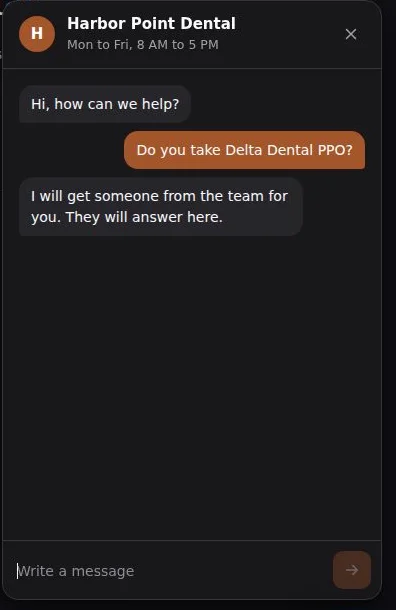
Answer only from saved business facts
The first answer reads the same business details the AI receptionist uses, plus workspace notes that match the visitor's question. It is instructed to answer in one to three short sentences and never invent prices, discounts or promises.
It hands off when the visitor asks for a person, when the answer is not in the saved details, or when the request concerns a complaint, refund, quote or change to an existing booking.
ChatGPT
Answer website questions from saved facts and hand off anything missing.
- Hours and servicesAnswered from saved details
- Workspace notesMatching notes included
- Unknown requestHanded to the team
Keep chat beside calls, texts and forms
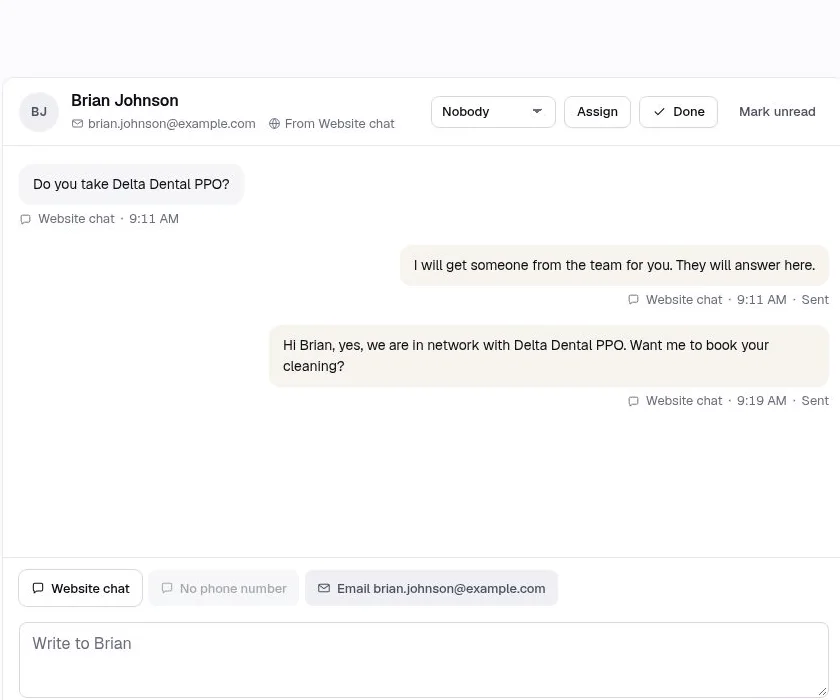
Every website chat enters the workspace Conversations inbox with the visitor's page, contact details when shared, handoff state and message history.
Your team can answer from the same inbox they use for other leads. The visitor sees staff replies in the widget when they are still on the page, or when they come back later.
Follow up once when nobody reaches the chat
If the visitor leaves an email address or a phone number with text consent, and nobody answers within 10 minutes of the handoff, Keystone follows up once from the workspace front door address or number.
The follow-up uses the same opt-out, consent, business texting approval and quiet-hour rules as other automatic replies. It does not start a marketing sequence.
ChatGPT
Follow up once with the website visitor who left their email.
- Follow-upOne email or text sent
- Sending rulesConsent and quiet hours applied
- Chat transcriptKept in the inbox
Know the cost before you install it
The Agency plan covers every client workspace under one subscription. The Personal plan is $19 a month for one business. New accounts start with 14 days free and no card.
The widget itself is part of the workspace. Text and email follow-ups use the workspace's normal sending rules and bill separately where usage applies. See pricing.
Questions
How do I add the widget to a website?
Paste the workspace script tag before the closing body tag, or turn on the Keystone Sites switch to add it to every Keystone site in that workspace automatically.
Does the AI make up answers?
It is instructed to answer only from saved business details and matching workspace notes, never invent prices or discounts, and hand off when the answer is missing or the visitor asks for a person.
Can a person take over the chat?
Yes. The conversation appears in the workspace inbox, and staff replies are delivered back into the website widget.
What happens if the visitor leaves before someone answers?
The thread remains in the inbox. If the visitor left email or textable phone details and nobody answered within 10 minutes of handoff, Keystone can send one follow-up under the normal consent and quiet-hour rules.
Can I limit the websites allowed to show the widget?
Yes. Turn on origin locking and list the approved hostnames. Other websites receive no chat, while subdomains of an approved host still count.