Put your AI to work inside every client’s accounts.

Connect Claude or ChatGPT to Google Ads, ServiceTitan, DataForSEO, and 1,700+ apps, for $79 a month across every client.

Edits and purchases ask your OK first, unless you enable a rule. 30 days free, no card.

1,700+ apps Google Ads, ServiceTitan, DataForSEO
ClaudeChatGPTCursorCodex
Lakeview Roofing

“Launch a roof repair campaign for Lakeview Roofing in Tulsa at $90 a day.”

  1. Page publishedRoof repair landing page live Live
  2. Domain boughttulsaroofrepair.com ($12, OK’d) Approved
  3. Form wired to CRMLeads routed to ServiceTitan Wired
  4. Tracking number live(918) 555-0148 (OK’d) Approved
  5. Conversion tracking onTest call & form verified in GA4 Verified
  6. Google Ads built3 ad groups, 9 ads, $90/day Waiting for your OK
Every purchase and ad launch waits for your OK.

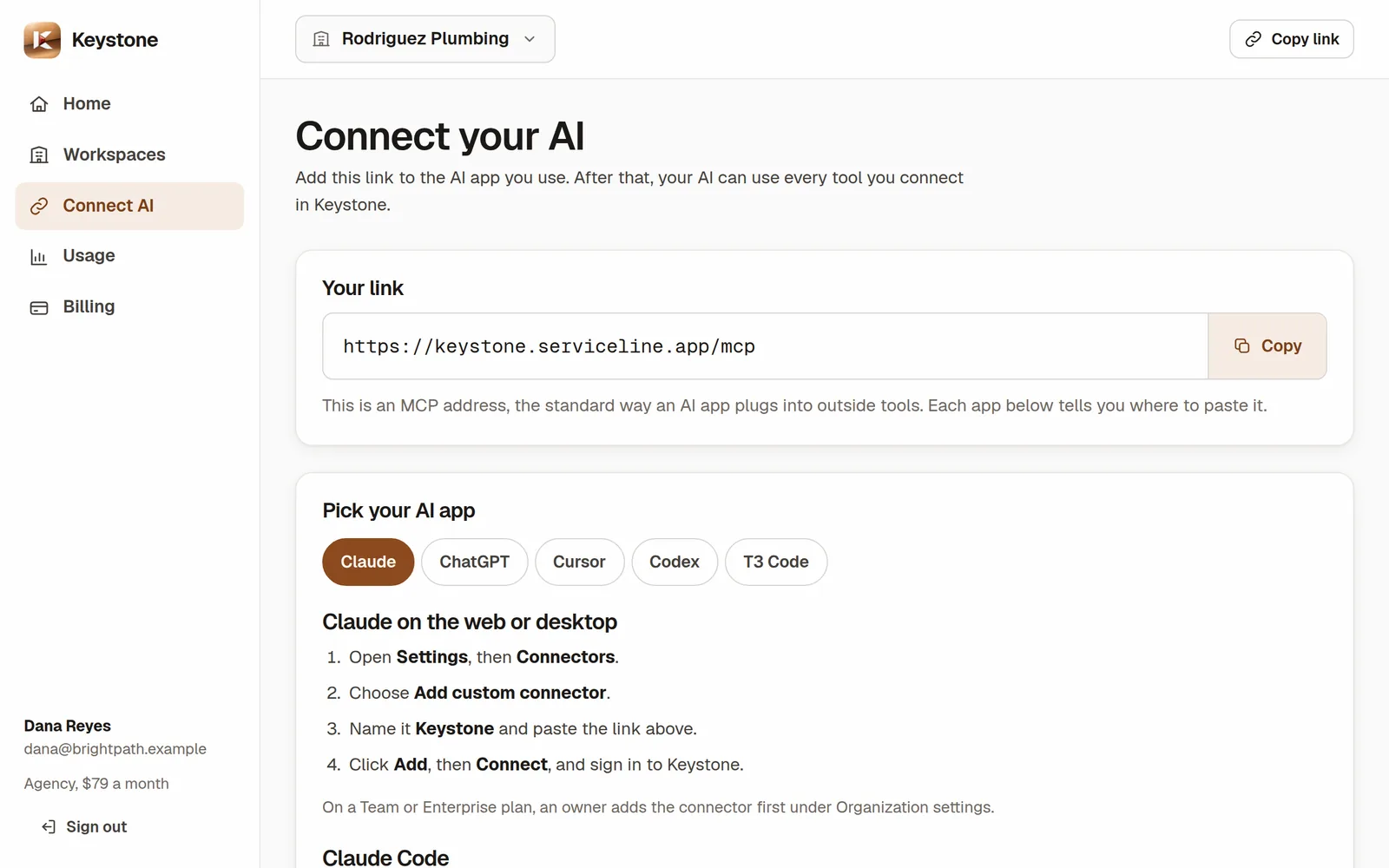
Add one link to the AI you already use

keystonecloud.ai/mcp
  • Claude
  • ChatGPT
  • Cursor
  • Codex
  • T3 Code

Everything your AI needs to run a client account

Make one workspace per client, connect their tools once, and add one link to Claude, ChatGPT, Cursor, or Codex. Your AI works inside the client workspace you name, remembers each client separately, and runs scheduled checks every week.

Every app, including ones with no API

Read and write across 1,700+ apps, including Google Ads, Search Console, GA4, Tag Manager, Business Profile, DataForSEO, call tracking, CRMs, and field-service software. Paste API docs for another app and Keystone generates the tools for it. Store logins for apps with no API, like Buildertrend or Towbook, and your AI signs in on Redshift computers (our hosted browser computers, so it does not tie up your laptop).

+1,700
Custom APIs Paste an app’s API docs link and Keystone builds its tools
No API Buildertrend and Towbook run on our hosted Redshift computers

Keywords and map rankings tracked every week

Keystone checks each client’s keywords and local map pack positions every week and saves the full history, so your AI spots trends early and brings proof to every client call.

Memory and documents for every client

Save your agency’s standards alongside each client’s brand voice, offers, service areas, and past reports. Months later, your AI still remembers that client’s history, margins, and past campaigns.

ServiceLine Pro’s playbooks come built in

ServiceLine Pro runs marketing for plumbers, HVAC shops, and roofers every day. Those field-tested playbooks and ready-made prompts come built into Keystone, so your AI starts from real home-service structures instead of a blank page.

Ready-made prompt

“Audit this client’s Google Ads account the ServiceLine Pro way and list the five fixes worth the most money.”

  • Local SEOService pages, city pages, and map signals for local search.
  • Google Business ProfileCategories, services, weekly posts, and review replies.
  • AI searchPages, citations, and reviews for ChatGPT, Perplexity, and Google AI.
  • Google Ads for home servicesService-split campaigns, negative lists, call assets, and budgets.
  • Meta ads for home servicesLocal offers, audiences, and lead forms built to book calls.
  • Call trackingLocal numbers per channel, call recordings, and call conversions.
  • Monthly reportingPlain-English reports tied to booked jobs and revenue.
  • Past-customer reactivationText and email campaigns for overdue customers.

Full campaigns launched from one request

Your AI builds and publishes the landing page, buys the domain, wires the form to the CRM, buys and forwards a tracking number, verifies conversion tracking, and builds the Google Ads campaign paused for your OK. After you approve a purchase, Keystone charges your card before buying the domain or number.

One subscription replaces your SEO and reporting stack

Weekly rank tracking, keyword research, backlinks, AI search checks, and live client portals run directly inside Keystone on DataForSEO, replacing separate SEO suites and reporting dashboards.

Real agency jobs you hand to your AI

From pitching a prospect to proving booked revenue in ServiceTitan, every job stays inside that client’s workspace. Account edits and purchases ask for your OK first, and you choose which recurring guards or follow-ups run automatically.

Win clients and set them up in an hour

Win the pitch before the call

Point Keystone at a prospect’s website and pull their rankings, active ads, reviews, site speed, AI search visibility, and top competitors into a branded PDF you bring to the sales meeting.

DataForSEOGoogle AdsGoogle MapsBusiness Profile

New client set up in one request

Create the workspace, send access invites for Google Ads, Search Console, GA4, and Business Profile, pull a baseline audit, and draft a 90-day plan in about an hour, so your team’s onboarding work is ready the moment the client accepts access.

Google AdsSearch ConsoleGA4Business Profile

Prove booked revenue and guard accounts overnight

A live client portal and monthly email report

Every client gets a branded live page showing their calls, leads, booked jobs, rankings, reviews, and spend, paired with a plain-English monthly report that lands in their inbox.

GA4Google AdsServiceTitanDataForSEO

Overnight watchdog for every client

Keystone checks every account each night for spend spikes, broken conversion tracking, downed forms, silent tracking numbers, ranking drops, one-star reviews, or a suspended Business Profile, alerting you and running any guardrails you turned on.

Google AdsTag ManagerTwilioBusiness Profile

Capture every lead, build reviews, and win AI search

Speed to lead in seconds

Turn on instant follow-up so a missed call gets a text back within seconds and a new form lead gets a call or text within a minute, before the homeowner dials the next contractor.

TwilioHighLevel

Reviews on autopilot

When a job closes in ServiceTitan or Jobber, the customer gets a review request by text. Keystone drafts replies to every review in the client’s voice for your approval and flags bad ones to the owner.

ServiceTitanJobberBusiness Profile

Local Services Ads lead disputes

Keystone reviews every LSA lead, spots calls that qualify for a credit (wrong service, out of area, or spam), and files the dispute once you turn on disputes or approve the batch.

Google Ads

Bring back past customers

Pulls past customers from the CRM or field-service app, selects everyone due for service, and launches an approved text and email campaign that books jobs from the list the client already owns.

ServiceTitanHighLevelMailchimpTwilio

Show up in AI search

Checks whether ChatGPT, Perplexity, and Google’s AI answers name each client for their services and towns, shows which competitors appear instead, and drafts the pages, reviews, and listings to close the gap.

DataForSEOChatGPTPerplexitySearch Console

Weekly competitor watch

Reports every week on competitors’ new ads, offers, landing pages, rankings, and review counts across every client market.

DataForSEOGoogle AdsMeta Ads

Weekly content engine

Writes and publishes service-area pages, blog posts, and Business Profile updates every week, each approved by your agency first.

Business ProfileWordPressWebflow
Real conversation example

A client asks why calls dropped. Your AI finds the cause and fixes it.

Ask about any client by name. Your AI reads their connected accounts, explains what happened in plain numbers, and executes the fixes once you approve.

ClaudeChatGPTCursorCodex Rodriguez Plumbing

Why did Rodriguez Plumbing get fewer calls in October?

  1. Google Ads Compared October against September across 4 campaigns
  2. Search Console Checked organic clicks for rodriguezplumbing.com
  3. HighLevel Counted calls and booked jobs by source

Calls fell from 212 to 164, and most of the drop came from Google Ads. Water Heater Repair ran out of budget on October 19 and stopped showing for 12 days. Organic clicks held steady at about 1,900.

I can add 14 negative keywords that cost $610 in October, move $300 a week to Water Heater Repair from Drain Cleaning, which booked nothing, and post a same-day repair update to the Business Profile. Should I make those changes?

Yes, go ahead.

  1. Google Ads Added 14 negative keywords ($610 wasted spend)Approved
  2. Google Ads Moved $300 a week from Drain Cleaning to Water Heater RepairApproved
  3. Business Profile Posted a same-day water heater repair updateApproved

Replace the separate SEO suite and reporting dashboard

Rank tracking, keyword research, backlink checks, AI search monitoring, and client reporting all live inside Keystone. Rank and keyword data come from DataForSEO, with two ways to pay for it.

Agency jobSeparate subscriptionsWith Keystone
Weekly rank tracking, keyword research, backlinksAn SEO suite like SemrushDataForSEO data tracked weekly in Keystone
Client portals and monthly reportsA reporting tool like AgencyAnalyticsLive branded portal and emailed plain-English report
Landing pages, tracking numbers, review follow-upsSeparate page, call, and review toolsBuilt, wired, and monitored by your AI per client

Bring your own DataForSEO login

Connect your DataForSEO account once. DataForSEO bills you directly at their rates, and Keystone adds nothing on top.

Use our DataForSEO account

No separate DataForSEO account needed. Pay only for the requests you run at DataForSEO’s wholesale cost plus 20%, charged to your card on file.

Every client stays in its own encrypted vault, with its own memory

When you ask about Garcia HVAC, your AI sees Garcia HVAC’s logins, rankings, notes, and documents, and nothing from any other client.

Every client in its own vault

Example agency account
  • Rodriguez Plumbingrodriguezplumbing.com · 14 memory notes & docs
    • Google Ads
    • ServiceTitan
    • HighLevel
    • DataForSEO
    Own key
  • Garcia HVAC & Airgarciaair.com · 9 memory notes & docs
    • Meta Ads
    • GA4
    • Jobber
    • QuickBooks
    Own key
  • Lakeview Roofinglakeviewroofing.com · 11 memory notes & docs
    • Google Ads
    • Search Console
    • Housecall Pro
    • Twilio
    Own key
  • Summit Electricsummitelectric.com · 7 memory notes & docs
    • Business Profile
    • Bing Webmaster
    • Mailchimp
    • Yelp
    Own key
  • Separate encryption key per client workspace

    Every login, API key, and token is encrypted with a key unique to that workspace. Secrets never appear in logs or on any page, and one client workspace cannot unlock another.

  • Agency and client memory that lasts

    Keep pricing sheets, brand voice rules, service areas, past reports, and SOPs inside each workspace. Six months later, your AI still remembers what worked and what to avoid.

  • Your AI asks before changing accounts or spending money

    Actions that edit a campaign, send a message, publish a page, or buy a domain ask for your OK first, unless you turn on a specific rule like missed-call texts or spend guards. New ad campaigns save paused, and approved purchases charge your card before Keystone buys them.

  • Unlimited Keystone tool calls on every plan

    Keystone never meters your AI’s calls across connected apps, with a guard of 300 calls a minute per account to stop runaway loops. Third-party domains, numbers, texts, and Keystone-billed DataForSEO data bill separately at cost plus 20%.

Set up a client in three steps

Make one workspace per client

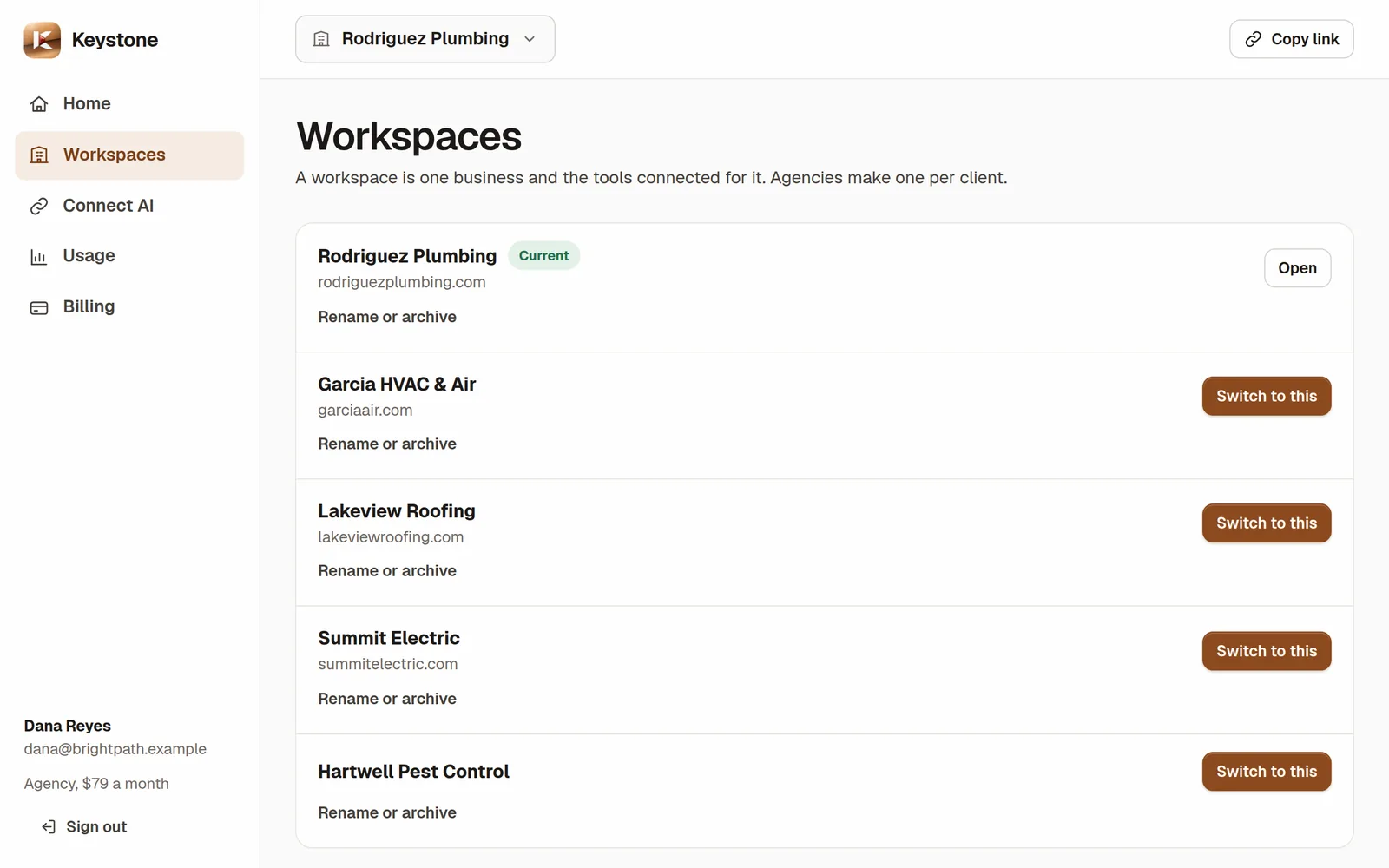
Every client gets its own isolated workspace for connected accounts, documents, and memory. Switch clients from the top bar or tell your AI the client’s name.

The Workspaces page in Keystone, listing five client businesses.

1,700+ apps, plus any API or login

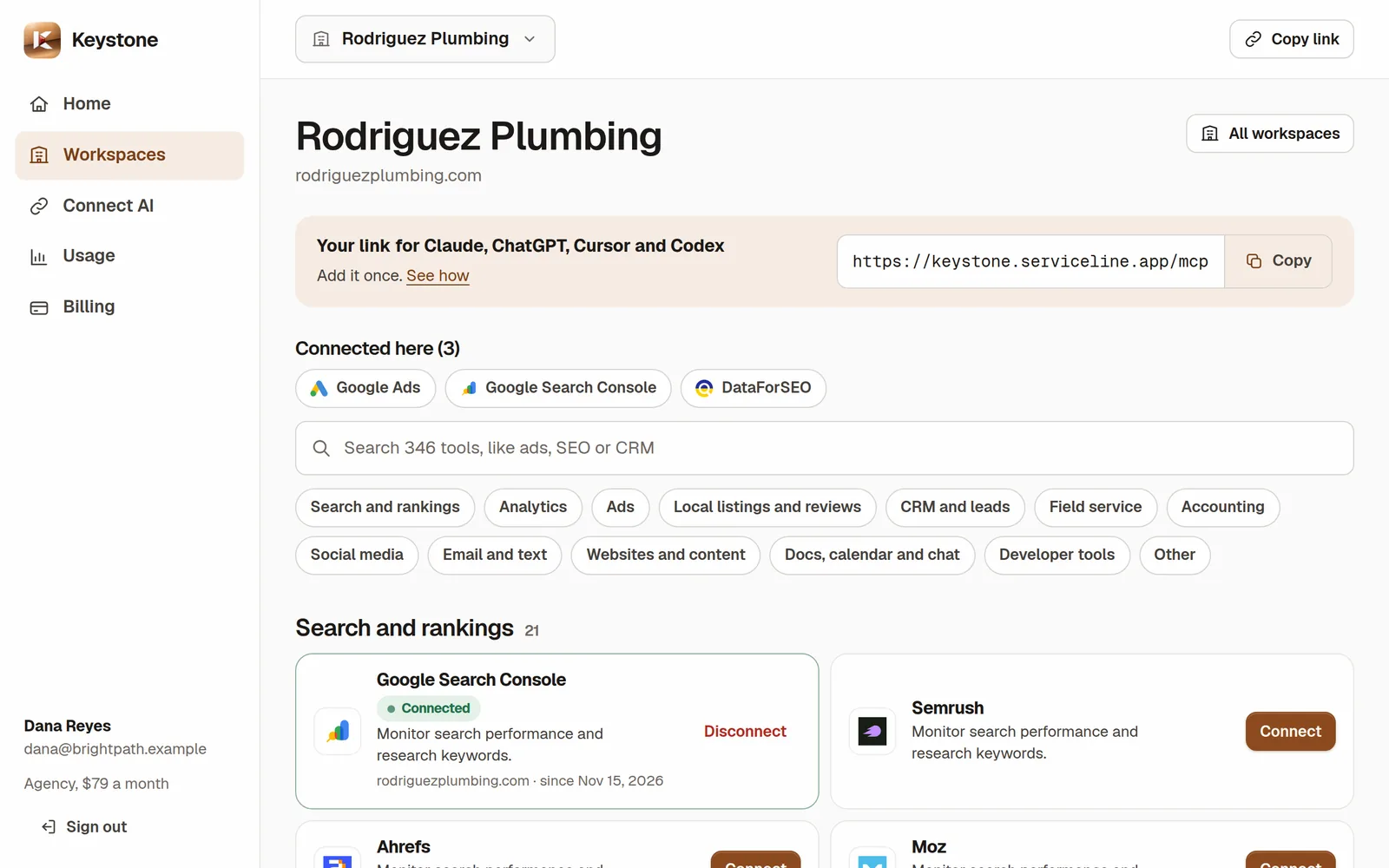
Search 398 featured marketing, CRM, and field-service apps below, connect any other app by pasting its API docs, or store a login for apps like Buildertrend and Towbook so your AI works inside them on Redshift computers.

Search and rankings

21 apps
  • Google Search Console
  • DataForSEO
  • Bing Webmaster Tools
  • Semrush
  • Ahrefs
  • Moz
  • SerpApi
  • Firecrawl
  • Apify
  • Bright Data
  • Exa
  • GTmetrix
  • Brave Search
  • Serper
  • ZenRows
  • Zenserp
  • BuiltWith
  • You.com
  • Scrapingbee
  • Search api
  • Tavily

Ads

8 apps
  • Google Ads
  • Meta Ads
  • Linkedin Ads
  • TikTok Ads
  • Reddit Ads
  • Pinterest Ads
  • Google Merchant Center
  • AdRoll

Analytics

15 apps
  • Google Analytics 4
  • Google Tag Manager
  • Microsoft Clarity
  • PostHog
  • Mixpanel
  • Google BigQuery
  • Amplitude
  • CallRail
  • WhatConverts
  • CallTrackingMetrics
  • Better Stack
  • Datadog
  • Census Bureau
  • Snowflake
  • SimilarWeb Digital Rank API

CRM and leads

36 apps
  • HighLevel sub-account
  • HubSpot
  • Salesforce
  • Pipedrive
  • Close
  • ClickFunnels 2.0
  • Zendesk
  • Ashby
  • Freshdesk
  • Front
  • Intercom
  • Greenhouse
  • Help Scout
  • Capsule CRM
  • Attio
  • Freshsales
  • Nutshell
  • Apollo
  • Lusha
  • Copper
  • Lever
  • Gong
  • Zoho Bigin
  • Kit
  • Gorgias
  • Breezy Hr
  • Workable
  • Hunter
  • Zoho Desk
  • Folk
  • People Data Labs
  • Clay
  • Crustdata
  • RocketReach
  • Prospeo
  • Bettercontact

Field service and local

17 apps
  • ServiceTitan
  • Jobber
  • Housecall Pro
  • Google Business Profile
  • Yelp
  • JobNimbus
  • Servicem8
  • Acculynx
  • Workiz
  • CompanyCam
  • FieldPulse
  • GorillaDesk
  • Birdeye
  • BrightLocal
  • Whitespark
  • Google Maps
  • Addressfinder

Accounting and payments

25 apps

  • QuickBooks

  • Stripe
  • Square
  • FreshBooks
  • Zoho Books
  • Xero
  • Deel
  • Ramp
  • Gusto
  • Zoho Invoice
  • Freeagent
  • Brex
  • Paypal
  • Plaid
  • Harvest
  • YNAB
  • Google AdSense
  • Lemon Squeezy
  • Mercury
  • ChartMogul
  • Gumroad
  • Recurly
  • Wise
  • Baremetrics
  • Foursquare

Social, email and text

62 apps

  • Facebook
  • Instagram
  • Twilio
  • Mailchimp
  • LinkedIn
  • YouTube
  • Klaviyo
  • SendGrid
  • SendPulse
  • ActiveCampaign
  • ClickSend
  • Discord Bot
  • Snapchat
  • WhatsApp
  • Instantly
  • Resend
  • Bolna
  • Agent Mail
  • Constant Contact
  • MailerLite
  • Twitter
  • Synthflow AI
  • Retell AI
  • Lemlist
  • Brevo
  • Postgrid
  • Smartlead
  • Aircall
  • Handwrytten
  • Reddit
  • Postmark
  • Zoho Mail
  • Vapi
  • Omnisend
  • Customer.io
  • AWeber
  • Smtp2go
  • Telnyx
  • Cardly
  • Pushover
  • Thanks.io
  • Pinterest
  • Bland AI
  • Threads

  • Discord
  • ZeroBounce
  • Heyreach
  • Telegram
  • Typefully
  • OneSignal REST API
  • Pushbullet
  • Lob
  • NeverBounce
  • Beehiiv
  • Buffer
  • Loops.so
  • Amcards
  • Bouncer
  • Tiktok
  • Woodpecker Co
  • Plivo
  • Ayrshare

Websites, docs and dev tools

214 apps
  • Webflow
  • WordPress.com
  • Google Drive
  • Google Sheets
  • Google Docs
  • Slack
  • Canva
  • Notion
  • GitHub
  • Google Super
  • MongoDB
  • Vercel
  • ElevenLabs
  • Shopify
  • PagerDuty
  • Railway
  • DocuSign
  • Basecamp
  • Trello
  • GitLab
  • SignNow
  • Outlook
  • Box
  • LaunchDarkly
  • Asana
  • PlanetScale
  • Microsoft Teams
  • Supabase
  • Render
  • Atlassian
  • Sentry
  • Dialpad
  • Smartsheet
  • Dropbox
  • Cal
  • ClickUp
  • Framer
  • Cloudflare
  • SharePoint
  • Wrike
  • Jira
  • Wix
  • Hugging Face
  • Shortcut
  • OpenAI
  • Algolia
  • Contentful
  • Excel
  • Monday
  • OpenRouter
  • Bitbucket
  • Daytona
  • Zoho
  • PandaDoc
  • Cloudinary
  • Coda
  • Neon
  • Mistral AI
  • Ngrok
  • Quo
  • Slackbot
  • OneDrive
  • AgencyZoom
  • Productboard
  • Frame.io V4
  • Eventbrite
  • Shippo
  • Zoom
  • Microsoft OneNote
  • Bitly
  • Miro
  • Rocketlane
  • HeyGen
  • Todoist
  • Clockify
  • CircleCI
  • Snyk
  • Confluence
  • Anchor Browser
  • Browserbase
  • Recall.ai
  • Langfuse
  • Gmail
  • Bugsnag
  • Egnyte
  • Make
  • Toggl
  • Dropbox Sign
  • DigitalOcean
  • Calendly
  • Imgix
  • PhantomBuster
  • Figma
  • Everhour
  • Prisma
  • Vimeo
  • PDF.co
  • Browser Use
  • Pinecone
  • Google Calendar
  • Linear
  • Mem0
  • Google Chat
  • Fly
  • BambooHR
  • AccuWeather
  • Short Io
  • Timely
  • Zep
  • Mural
  • NocoDB
  • Rev AI
  • Connecteam
  • Typeform
  • Jotform
  • Bannerbear
  • Replicate
  • E2B
  • Microsoft PowerPoint
  • Perplexity AI
  • Airtable
  • Bugherd
  • Fireflies
  • Webex
  • Ably
  • Google Meet
  • Googlecontacts
  • Docker Hub
  • Sanity
  • Zeplin
  • Better Proposals
  • DocuSeal
  • Giphy
  • Cohere
  • Fillout Forms
  • Microsoft Word
  • Rebrandly
  • Runway
  • SurveyMonkey
  • Ticktick
  • Findymail
  • Reply
  • PDFMonkey
  • Tally
  • Braintrust
  • Deepgram
  • Docmosis
  • Dub
  • Grain
  • Google Tasks
  • Jam
  • Wistia
  • Zoominfo
  • Bubble
  • Qwilr
  • Uptimerobot
  • Baserow
  • Black Forest Labs
  • Boldsign
  • Descript
  • Google Admin
  • Hacker News
  • Fal.ai
  • Google Photos
  • Pingdom
  • Process Street
  • Craftmypdf
  • Crisp
  • Npm
  • Teamwork
  • Carbone
  • NotebookLM
  • Placid
  • 7shifts
  • Airtop
  • API2PDF
  • Builder.io
  • Cartesia
  • Fathom
  • Googleforms
  • Storyblok
  • AssemblyAI
  • Bitwarden
  • Fireworks AI
  • Netlify
  • Pexels
  • Captions
  • Datagma
  • Gemini
  • LMNT
  • Brandfetch
  • Browserless
  • Google Slides
  • GroqCloud
  • Speechmatics
  • Tldv
  • 1password
  • DeepSeek
  • Buildkite
  • Formsite
  • Paperform
  • Prismic
  • ScreenshotOne
  • TinyPNG
  • Abyssale
  • Humanloop
  • Linkup
  • Agentql
  • Anthropic Administrator
  • Otter.ai
  • Turso
  • OpenWeatherMap
  • Tinyurl
  • TimeCamp

$79 a month for every client. $19 a month for one business.

Unlimited Keystone tool calls, unlimited client workspaces on Agency, and 30 days free with no card.

Agency For agencies

$79 a month

Every client you manage, at one flat price.

  • Unlimited client workspaces and team seats
  • 1,700+ apps, custom API builder, and app logins
  • Weekly rank tracking, live client portals, and overnight watchdog
  • Client memory, documents, and ServiceLine Pro playbooks
  • Unlimited Keystone tool calls
Get early access

Personal

$19 a month

For one business, usually your own.

  • One workspace and one seat
  • 1,700+ apps, custom API builder, and app logins
  • Weekly rank tracking and overnight account checks
  • Business memory, documents, and ServiceLine Pro playbooks
  • Unlimited Keystone tool calls
Get early access

Both plans start with 30 days free and no card needed, with full Agency access during the trial. Pick a plan when the trial ends and every workspace stays intact.

Third-party purchases and metered data stay separate from your monthly plan. After you approve a purchase, domains, tracking phone numbers, texts, and DataForSEO requests run through our account charge your card on file at wholesale cost plus 20% before anything is bought. Add a card during the trial only if you want to buy those through our account; bring your own DataForSEO login and DataForSEO bills you directly with zero Keystone markup.

Test Keystone on one client with 30 days free

Tell us your agency’s name, how many clients you manage, and the tools you use. We open your empty account personally, you connect one client workspace yourself with your own DataForSEO login or ours, and you test real audits and campaigns with no card required.

Get early access

Questions agency owners ask first

Does my AI change accounts or spend money without asking?

No. Keystone marks every action that changes an account, publishes a page, sends a message, or spends money, so Claude, ChatGPT, Cursor, and Codex ask for your OK before running it. New Google Ads campaigns save paused, and after you approve a domain or tracking number, Keystone charges your card before buying it. Recurring rules like missed-call texts or spend-spike pauses stay off until you explicitly turn them on per client.

How does Keystone connect to ServiceTitan, Buildertrend, or niche apps?

Keystone connects directly to 1,700+ apps across Google Ads, Search Console, GA4, Tag Manager, Business Profile, DataForSEO, call tracking, CRMs, and field-service tools like ServiceTitan, Jobber, and Housecall Pro. For any other app with an API, paste its docs link and Keystone builds its tools. For apps with no API, like Buildertrend or Towbook, store the login in the client workspace and your AI operates the app inside our hosted Redshift browser computers, without tying up your laptop.

Where do rankings, keyword data, and AI search checks come from?

From DataForSEO. Connect your own DataForSEO login and DataForSEO bills you directly with zero Keystone markup, or use our DataForSEO account and pay for what you run at wholesale cost plus 20%, charged to your card on file.

What is the one link I add to my AI?

It is the address your AI app uses to reach your Keystone workspaces: https://keystone.serviceline.app/mcp. Paste it once in Claude, ChatGPT, Cursor, or Codex and sign in. Our setup page walks through the exact clicks for each app.

Who can see my clients’ logins, memory, and data?

Only you and the team members you add to your account. During early access we create your empty agency account and send your sign-in invite, and you connect your clients’ accounts yourself. Every workspace encrypts its own logins and keys separately, and Keystone staff never see your stored secrets or train AI on your data.

What costs extra beyond the monthly plan?

Besides your own Claude or ChatGPT subscription, only third-party purchases and metered data: domains, tracking phone numbers, texts, and DataForSEO requests run through our account. Each charges your card on file at wholesale cost plus 20% after you approve it and before anything is bought.

What happens after 30 days?

Choose Agency at $79 a month for unlimited client workspaces and seats, or Personal at $19 a month for one business. Every workspace, connection, and memory document stays right where you left it.