Show clients live results under your agency brand
A white label client portal gives each client one branded link for calls, leads, booked jobs, ad spend, rankings, reviews and monthly reports. Keystone reads the live workspace data, while your agency controls the name, colors, logo, domain, visible sections and support details. Included on every plan. Usage is billed separately.
https://keystonecloud.ai/mcp- Claude
- ChatGPT
- Grok Bot
- Cursor
- Codex
Claude
Create the client portal for Riverbend Dental with our agency branding.
- Private portal linkCreated once and ready to share
- Agency brandingName, color, logo and domain applied
- Monthly reportPublished inside the portal
Answer client questions with live results
Clients can check calls, leads, booked jobs, ad spend, cost per job, rankings, map grids, reviews, website traffic and customer value without waiting for a screenshot. The portal is read-only, so a client can review results without changing the workspace.
Each section comes from the client's own Keystone workspace. If an app is not connected, the portal leaves that section out instead of filling it with a placeholder number.
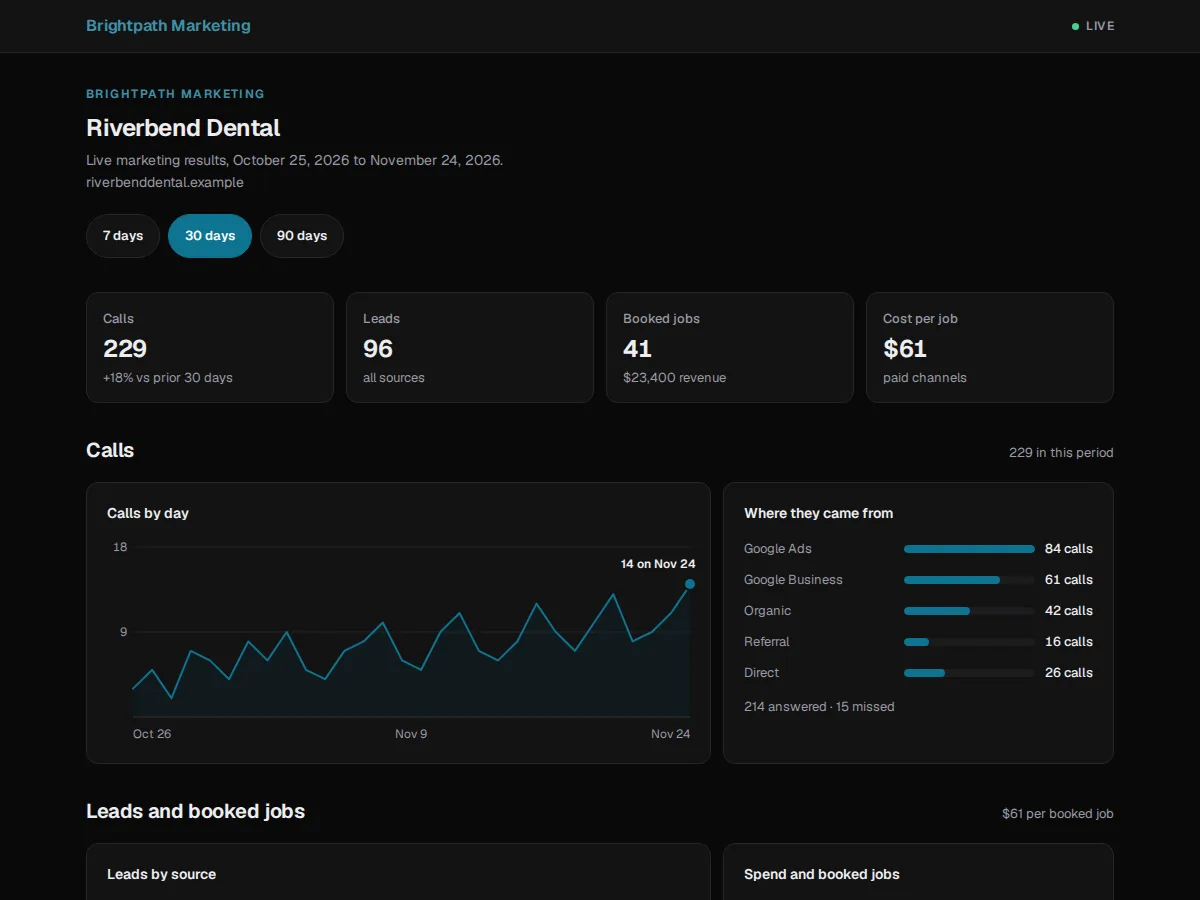
Put your agency brand on every client surface
Set the agency name, colors, logo, font, corner style, portal domain, welcome message, support contact and report cover once. Keystone applies that branding to client portals, login pages, emails, share pages and PDF report covers.
You can also choose which portal sections a client sees and hide the Powered by Keystone mark where the plan allows it.
ChatGPT
Use our brand on every client portal and report cover.
- Portal pagesAgency name, color, logo and domain
- Client emailSender name and footer applied
- PDF reportsBranded cover and prepared-by line
Publish monthly reports without rebuilding them
Ask Claude, ChatGPT or Grok to generate the month's client report. Keystone pulls calls, leads, booked jobs, ad spend, rankings, map grids and reviews from the workspace, writes a plain-English summary, saves it to documents and publishes it in the portal.
Clients can read the report in the portal or open a PDF copy. Shared audit links can be revoked when access needs to change.
Claude
Write November's report for Riverbend Dental and publish it.
- Monthly reportSummary, results and next steps written
- Client portalReport published inside the portal
- PDF copyBranded copy ready to open
Share proof without handing out workspace access
The portal link opens a read-only client view. It does not sign the client into Keystone, expose other workspaces, or let them change apps, wallet settings or customer records.
When a client staff member does need to work inside Keystone, workspace seats stay separate from the public portal link. Owners and admins control both.
Know the portal cost before you roll it out
The Agency plan covers every client workspace under one subscription. The Personal plan is $19 a month for one business. New accounts start with 14 days free and no card.
Each workspace includes 3 users; extra workspace users cost $10 a month each. Client portal links themselves do not add a per-client dashboard fee. Connected apps, phone usage, reports that use paid data and other usage still bill separately where applicable. See pricing.
ChatGPT
What does the client portal cost for our agency?
- Agency planOne agency plan for every client you run
- Workspace users3 included, then $10 a month each
- UsageBilled separately from the wallet
Questions
Does the client need a Keystone login?
No. The portal opens from a private read-only link. You can revoke the link and create a fresh one when access needs to change.
Can I choose my own name, logo, colors and domain?
Yes. Branding settings cover the agency name, logo, colors, font, corner style, portal domain, support details, email sender, report covers and visible portal sections.
What results can the portal show?
Depending on the workspace connections, it can show calls, leads, booked jobs, ad spend, cost per job, search rankings, map grids, reviews, website traffic, customer value, monthly reports and client videos.
Can a client edit their workspace from the portal?
No. The portal is read-only. Workspace access, app connections, spending fields and customer records stay behind owner, admin and member permissions.